Free download
Tempo Nudge
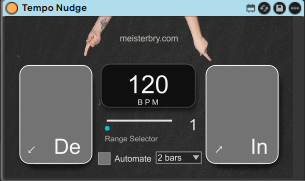
A Max for Live device: tap a button and the tempo jumps by whatever range you've dialed in, or let it glide into the next bar so the shift actually lands on the beat.
I built Tempo Nudge because I kept watching a track's energy flatline mid-set and wanting a way to push through it without breaking the groove.
Two buttons on the device, one drops the tempo, one lifts it, both by a range you've already dialed in. Tap and it jumps immediately. Or flip on Automate and instead of a jump, it eases into the next bar, so the tempo change actually lands on the beat instead of dragging the groove sideways while it catches up. Pick how many bars the glide takes, 1, 2, 4, 6, or 8, depending on how obvious you want the shift to feel.
There's a live BPM number right on the device too, so you're not tabbing over to Live's transport to check where the tempo actually landed after a few taps.
Every control maps to MIDI or a keyboard key, so none of this requires touching a mouse. Set your range once, map the buttons to your controller, and the whole thing becomes something you can play during a set without looking at the screen.
Range: 1–10 BPM. Glide: instant, or bar-synced at 1, 2, 4, 6, or 8 bars. Needs Ableton Live 11 or 12 with Max for Live.
Tempo Nudge
Free